
The new wave of bots in TF2 Casual: what is going on
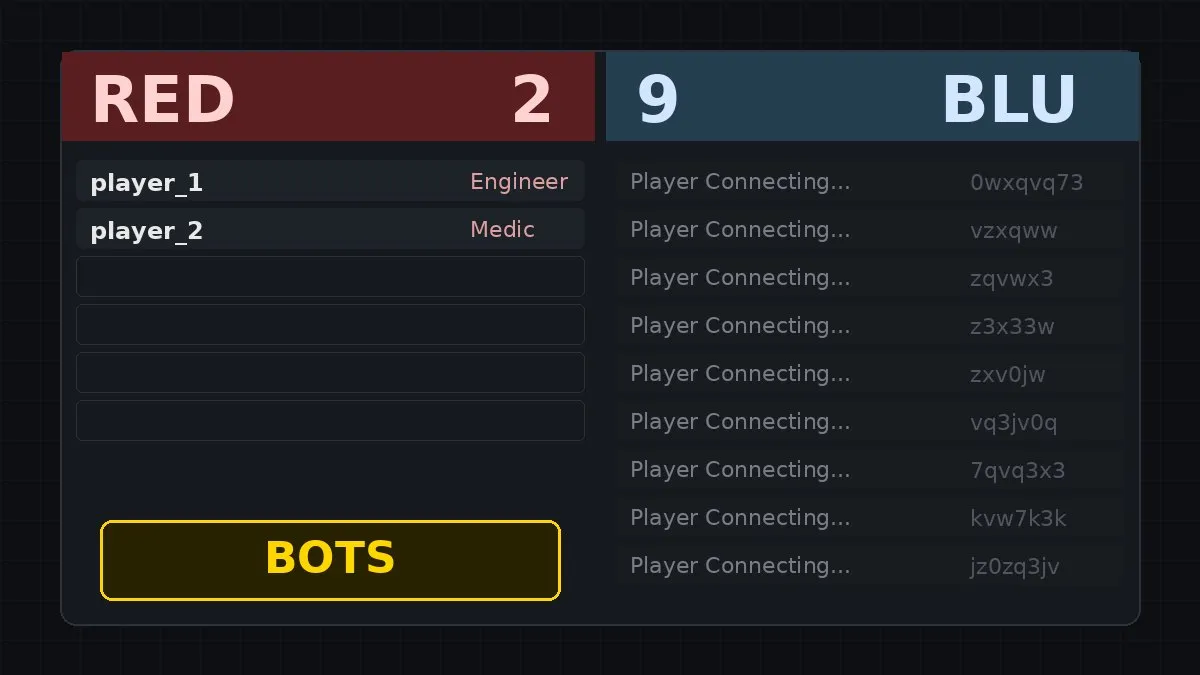
Right after the Halloween update, at the end of October 2026, anyone who tried to play Team Fortress 2’s Casual mode found something strange: servers showing as full, but with half the players stuck on “Player Connecting…”, 2 versus 7 teams and matches that never fill up. The bots are back, and this time in a different way.
In this post we explain what is happening, why it is different from previous waves and how to keep playing TF2 without the frustration. The information comes from community reports, from videos such as not this again… (already outdated), from the Jontohil2 channel, and from the bug reports opened on Valve’s GitHub.
A bit of history: #SaveTF2 and #FixTF2
Bots are nothing new in TF2. For years, Casual suffered from automated accounts using aimbots, stealing players’ names, flooding the chat with spam and calling votekicks on anyone who tried to report them. The community answered with the #SaveTF2 campaign in 2022 and #FixTF2 in 2024.
In 2024 the pressure was huge: a petition asking Valve to fix the problem passed 120,000 signatures, and the game’s recent Steam reviews hit “Mostly Negative” for the first time. Valve then publicly acknowledged how big the problem was, and a series of updates in mid-2024 drastically reduced the cheating bots.
What changed now: “ghost” bots
The 2026 wave is not about aimbot bots. According to the reports, these are accounts that never even open the game. They talk directly to the Game Coordinator, the Valve system that builds Casual matches, join the queue and get sent to servers as if they were real players. These “headless” clients, as the community calls them, do not actually run TF2, so many of them can run at the same time.
The problem lies in how Casual reserves slots. When you are placed in a match, the server holds your spot while you connect. The bots enter that state and stay there, as “Player Connecting…”, never finishing loading. To the system, the slot is taken. The result:
- Servers that are “full” and empty at the same time: the server shows as packed, but almost nobody is actually playing.
- Unbalanced teams: 2 versus 7 matches, or half a team grayed out on the scoreboard.
- Endless autobalance: when one of these bots finally gets in, it usually leaves right away, and the game keeps moving players between teams.
- Strange names: many accounts show up with scrambled names, joining and leaving quickly.
The reports on Valve’s bug tracker say the problem got much worse starting October 29, and that popular maps such as Upward and Badwater were among the hardest hit.
What about Valve?
Players opened reports on Valve’s GitHub in the very first days, including suggested fixes: a time limit for loading, freeing the slot when that time runs out, and blocking accounts that keep joining matches without ever loading. One of those reports was closed as a duplicate, and another stayed open without an official reply in the first days.
In the following days, content creators recorded moments of improvement and, later, reports that the situation had gotten worse again. In other words, things are changing fast. If Valve ships a fix, we will update this post.
Why community servers avoid this
This attack targets Casual matchmaking: the Game Coordinator picks the server and reserves the slots, and that reservation is what the bots exploit. On a community server, like the SKYNET ones, things are different:
- You choose where to play: you connect directly, through the server browser or the
connectcommand, with no Casual queue in between. - Someone is watching: admins can kick, ban and investigate on the spot, and bans are recorded in a dedicated system, like our SourceBans.
- A real community: the same players come back every day, so it is easy to notice and report anyone who is not human.
No server is immune to cheaters, but on a community server there is someone to act. If you have never joined one, see the step-by-step guide in How to join a TF2 community server.
What you can do
- Report the bots in the game itself or through their Steam profile. Even if it takes time, reports help Valve identify the accounts.
- Do not argue in chat: whoever runs bots wants attention. Report and move on.
- Favorite the community servers you enjoy, so you do not depend on Casual.
- Follow TF2’s official channels to know when a fix comes out.
Play without bots at SKYNET
While Casual is not back to normal, the SKYNET servers are open: four TF2 servers in São Paulo, with real admins, clear rules and a ranking. If you want to chat with the community, report a problem or just find people to play with, join our Discord.